You have the idea for an AI product. Ortive walks the rest of the way with you.
Ten guided steps, end to end. Pick a product type, get a real blueprint, choose your stack, coded or no-code, then turn it into an offer, a sales page, a cold-email sequence and a revenue model. One session. One export. Nothing left at the demo stage.
It was never the idea. It is everything that comes after it.
You can describe the product in one sentence. You cannot describe the stack, the ideal customer, or the price, and those are the three questions everyone asks first.
Every tutorial stops at the working demo. Nobody hands you the pricing grid, the landing copy, the three cold emails and the launch checklist that turn it into revenue.
So it sits in a notes app for six months while you compare tools you will never open twice. The idea does not die. It just never gets a price tag.
Two tracks. Ten steps. One export.
Build turns the idea into a buildable spec. Monetize turns the spec into something a customer can pay for. Each step feeds the next, answer once, and it carries all the way through.
Agent, SaaS app, chatbot, API, automation, mobile app, plugin or copilot. Everything downstream adapts.
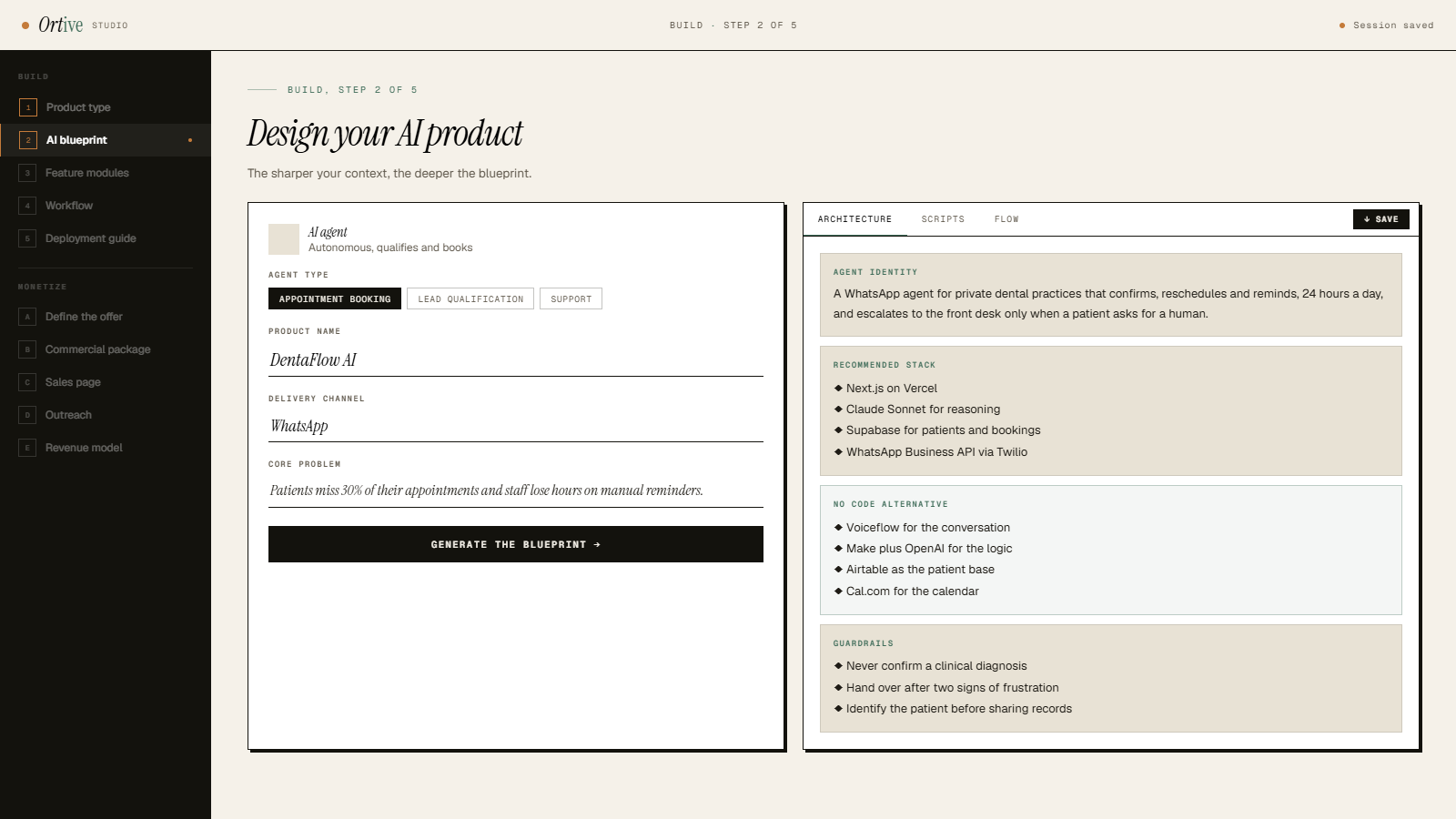
Positioning, core problem, MVP and V2 features, tech stack with a no-code alternative, ICP, revenue model, risks.
Thirty-six toggles across AI core, communication, logic, actions, integrations and infrastructure.
The end-to-end execution flow, the delivery channels you actually ship on, and your behaviour rules.
Named tools, monthly costs, four build phases week by week, a launch checklist and the warnings nobody tells you.
Industry, problem, ideal customer, differentiator, pricing model and price, pre-filled from your blueprint.
Product name, tagline, hero headline, five selling points, social proof line and a three-tier pricing grid.
Hero, problem, solution, features, testimonials, FAQ and closing CTA, section by section, ready to paste.
A three-email cold sequence, intro, value follow-up, break-up, written for the customer you described.
Month 3, 6 and 12 projections with churn, plus the launch checklist that tracks what you have actually done.
Specific enough to act on tomorrow morning.
Agents get system prompts, opening scripts and objection handling. SaaS gets competitor analysis and pricing tiers. The output changes with the shape of the thing.
Every stack comes twice, the engineering route and the Bubble/Make/Airtable route, with an honest line on what you trade for speed.
Not "a vector database", the one to use, why, and what it costs per month. Totals so you know your burn before you start.
Chat, voice, WhatsApp, SMS, email, API. Set escalation and disclosure rules once and they show up in every downstream output.
Three tiers with who each is for, a recommended middle, and a revenue projection that factors churn instead of ignoring it.
Blueprint, deployment guide, offer, sales copy, emails and projections, one file, ready for your docs, your co-founder or your client.
Ten screens, one session.
This is the Ortive Studio interface as it works today. Click any step in the sidebar. Grey lines mark where your generated output appears.
Four hires, four briefs, four invoices.
Scoping an AI product properly usually means assembling a small team of specialists, one at a time, and holding the whole thing together yourself.
Picks your stack and sequences the build, if you can find one who will scope the work before locking you into a retainer.
Works out your ideal customer, the competitive landscape and your tier structure. Before a single line of sales copy exists.
Turns the positioning into a page people actually read.
Writes the cold sequence that puts the offer in front of someone.
Plus four rounds of revisions, four sets of expectations to manage, and three weeks of waiting on drafts that may never arrive.
Product blueprint, capability map, workflow, deployment manual, sales package, landing page and outreach sequence. The same output, minus the part where you manage five relationships to get it.
Built for people launching an AI product without a full team.
Shipping a first AI product with nobody to sanity-check the stack, the price or the pitch.
Scoping AI builds for clients, and needing a credible spec and quote in an afternoon rather than a fortnight.
Who want the no-code route spelled out, platform, automation layer, database, payments and what it costs.
Packaging AI offers for SMBs, who need tiers, outreach copy and projections that hold up in a room.
Start free. Pay when you are ready to launch.
Every step in Ortive Studio has a fixed credit cost, shown before you run it. Your free credits cover the Build track up to the deployment manual. A full pass through all ten steps uses 300 credits.
See your product take shape before you pay.
Take a product from spec to launch.
For a portfolio of products, or for client work.
Free credits never expire, purchased credits expire 30 days after they are granted if unused, and all purchases are final, with no refunds, including for expired unused credits.
Before you sign up
What happens after I sign up?+
We send you a confirmation email. Click the link and you will be signed in automatically, with 100 free credits ready to use. Cannot find the email? Check your spam folder and add info@angeingabire.com to your contacts.
Is this just a prompt wrapper?+
It is a sequence. Each of the ten steps is shaped by your product type and by everything you answered before it, a blueprint for an agent looks nothing like one for an API, and your outreach emails inherit the customer you defined in step A.
I cannot code. Is this for me?+
Yes. Every stack recommendation comes with a no-code equivalent, platform, AI layer, database, automation, payments, hosting, plus a plain-language note on what you give up and what you gain.
Can I use the output with clients?+
It is yours. Export the full session as a single document and drop it into a proposal, a scoping call or a project brief. Plenty of the first users are agencies doing exactly that.
Does it build the product for me?+
No, and that is deliberate. Ortive gives you the spec, the stack, the phased plan and the whole commercial layer. You build it where you build things, with weeks of decisions already made.
What does it cost?+
Start free with 100 credits and no card. Paid packs are $49 for 500 credits or $99 for 1,200 credits. The full breakdown is in the pricing section above.
Give the idea a price tag this week.
Run a full session, blueprint through revenue model, and walk out with the spec, the stack and the whole commercial layer.
Start free with 100 credits. No card required.